
Tag Archives: RockWorks

Improvement to RockPlot2D

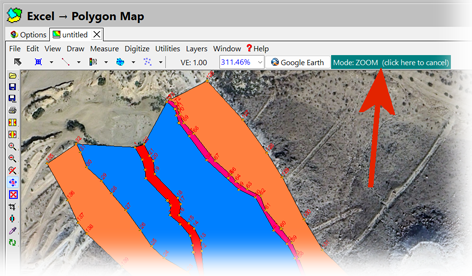
The RockPlot2D program has been modified such that the current “mode” is prominently displayed at the top of the dialog.  Clicking on the mode button will automatically cancel the current mode and return control to the “Edit Mode”.  This replaces the former controls that were less prominently displayed within the lower-left corner of the screen.

Using GeoTIFF files in RockWorks:

The GeoTIFF import is really designed to import DEMs saved as GeoTIFFs, and not images.

If you want to display the image in RockPlot2D, you can import it through the File | Import | Raster Image menu.  You can use the world file to georeference the image, as long as the coordinate system is the same (the program does not read the PRJ file).

If you want to drape the image over the RwGrd file, the Image | Drape program allows you to select the image and world file, along with the RwGrd file.

New programs titled “Grid Evaluation” and “Solid Evaluation” have been added to RockWorks.

Use these programs for quantifying the “goodness-of-fit” for an interpolated grid or solid model. The Evaluation programs generate a report with diagrams that depict the accuracy of a grid or solid model relative to the original control points used to interpolate the grid or solid values.

New ModOps, Contours → Grid program

The Contours → Grid program will convert the polyline data within a RwDat or a Rw2D file into a grid
model constructing a triangle network between the vertices of the polylines and estimating the
elevations of the grid nodes that reside within these triangles. Found in the >ModOps >Grid >Create menu.