

New Features in AqQA 2.0
AqQA has been updated to run only as a 64-bit application. Its interface and functionality remain largely consistent with AqQA 1.5, with a few additional features introduced.
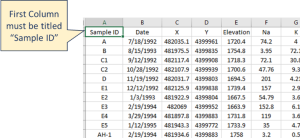
CSV Data Import: The NEW File | Import Data menu allows users to import data from a CSV file, typically created in Excel and exported to CSV format. In this format, samples must be organized by rows, with the Sample ID listed in the first column.
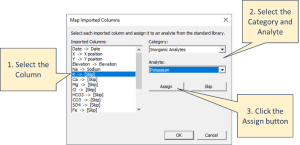
The CSV importer allows users to map each column to an “analyte” in the AqQA database by following these steps:
- Select the column of data to map in the panel on the left.
- Choose a Category and Analyte from the drop-down lists.
- Click the Assign button.
- After assigning analytes to all desired columns, click OK to complete the import.
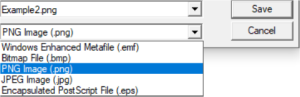
New Graphic Exports: The File | Save As Image menu now includes options to export images in both PNG and JPG formats.
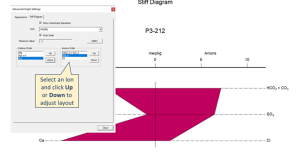
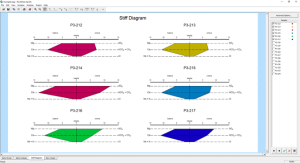
New Stiff Diagram Layout Options: Stiff diagrams now offer flexible layout options, allowing the anions and cations to be moved up or down relative to one another.
Also, more than one Stiff Diagram can now be plotted on a single page.
Updated licensing scheme for compatibility with newer versions of Windows.
Note to existing users: The new licensing scheme is for Annual Licenses of AqQA only. This means that when you need to install or transfer the software to a new computer, you will be required to purchase AqQA 2.0 with its new licensing type.
(Released May 2026)