
We are pleased to announce the release of PetraSim v2025.2, which includes bug fixes and several program improvements.
Please note that users must have a maintenance contract that expires after 11/30/2025 in order to use PetraSim v2025.2.
If you are using an older version of PetraSim with expired maintenance and would like to obtain a trial license for the new version, please contact sales@rockware.com.
Users of PetraSim v2025.1 who are on a current maintenance plan can simply download and install PetraSim v2025.2—no additional licensing steps are required—using this LINK.
New Features/Improvements
- A new File | Load Cell Data menu allows users to load the following properties into a model using the XYZ file format created through File | Write Mesh Data menu:
- Volume Factor
- Permeability Modifier (PMX)
- Porosity (PORX)
- Material
- Active
- Fixed Flag
- Cell Name
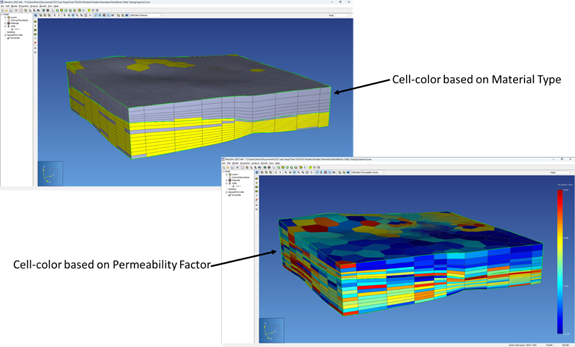
- The new Model | Import Cell Data program allows users to import Material Type, Permeability Modifier (PMX) and Porosity values stored in ASCII XYZ”G” files into a TOUGH mesh. This allows the user to superimpose geo-models created in programs such as RockWorks™ and Leapfrog™ over an existing TOUGH mesh.
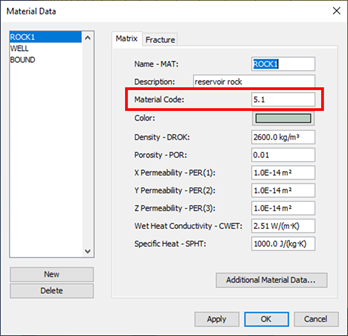
- A new field called the Material Code has been added to the Material Data Editor. This is used by the Model | Import Cell Data program when importing Material Types.
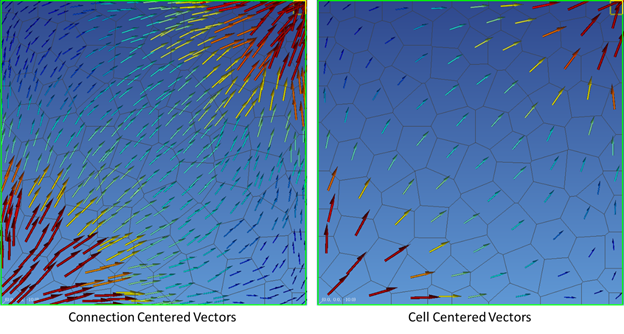
- Vector plots for Polygonal Meshes now include two options:
- Connection Centered – mimics vector behavior from older versions of PetraSim, with multiple vectors plotted per cell.
- Cell Centered – plots a single vector at the center of each cell.
- Polygonal mesh vectors can now be exported in TEC format.
- Enhancements have been made to error reporting and licensing messages displayed in PetraSim.