
Home / A to Z All Products / RockWorks / RockWorks Borehole Data Types / Lithology Data in RockWorks
RockWorks’ specialized modeling method allows you to interpolate a continuous lithology model. Lithology data can be displayed with RockWorks in numerous different formats based on the lithology model, or on the lithology data itself.
Lithology logs
Display observed lithology intervals in strip logs (2D and 3D) and log sections.
Lithology model profiles and cross-sections
Display the continuous lithology model as a single-panel vertical slice or “profile”, or as a multi-panel cross section.
- Append a lithology legend
- Add border coordinate labels
- Create an automatic section location map


Lithology model as 3D slices or fence panels
Display the continuous lithology model as 3D slices or fence panels.
- Append a lithology legend
- Create fence panels in regular configurations or draw your own
- Manipulate the fence in the 3D viewer – turn panels on/off, zoom, rotate
- Append 3D logs automatically
- Create an automatic fence panel location map

Lithology model as a 3D solid
Display the continuous lithology model as a solid in the 3D window.
- View volumes of the different lithology types
- Filter for specific lithology types
- Zoom, rotate model in the 3D viewer
- Append 3D logs automatically

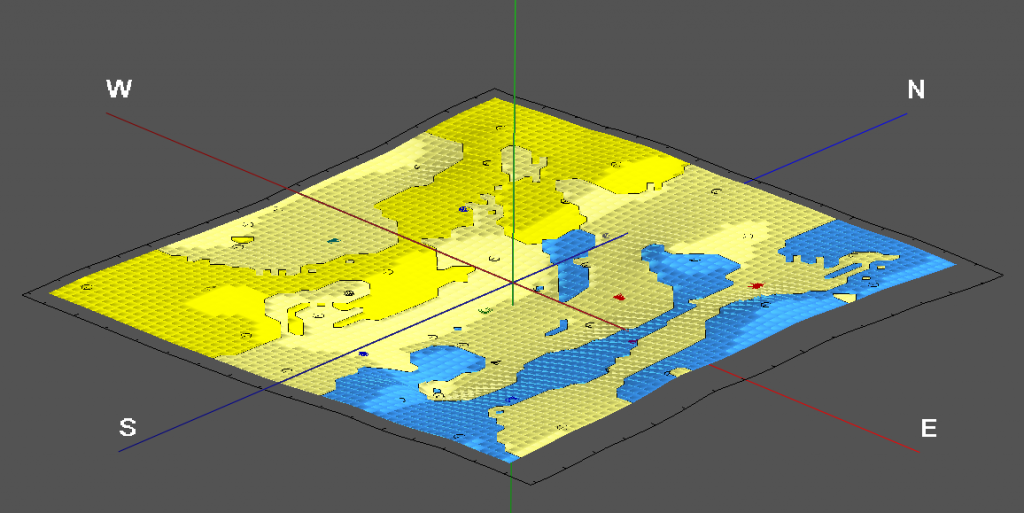
Lithology based geology maps
Create geology maps based on lithology.
- Display lithology where it intersects a surface, such as the ground or sub-surface structures
- Create a lithology map at a user-specified elevation – a horizontal slice
- Display lithology as colors or include rock-type patterns
Lithology quantitative data analysis
Create detailed reports of the volume of each lithology type, at user-specified intervals. The report can also list percent of material, numbers of nodes, and mass.
Convert lithology intervals to quantitative values (e.g. porosity, grain size).