New products
Visual MODFLOW QuickStart Package
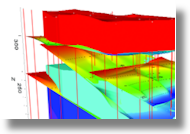 Span the entire spectrum of your groundwater flow system.
The Visual MODFLOW QuickStart Package allows you to quickly
develop your conceptual model and easily run your simulations in Visual MODFLOW
Standard. This Package includes Visual MODFLOW Standard and Visual MODFLOW 3D-Builder for only
$2,495 USD. Span the entire spectrum of your groundwater flow system.
The Visual MODFLOW QuickStart Package allows you to quickly
develop your conceptual model and easily run your simulations in Visual MODFLOW
Standard. This Package includes Visual MODFLOW Standard and Visual MODFLOW 3D-Builder for only
$2,495 USD.
This Visual MODFLOW add-on module provides the features and capabilities for streamlining simple or complex
groundwater modeling workflows. From raw data, to the conceptual model, to the numerical model,
Visual MODFLOW 3D-Builder will dramatically improve the way you build your groundwater models.
- Build your conceptual model of the groundwater system, prior to the simulation
- Build the model with minimal data pre-processing
- Generate and simulate regional and local-scale models
- Make changes to the conceptual model data and immediately see results
- Run the simulation and interpret results
Read more
Place an order
Back to top

FEATURED PRODUCTS
AQTESOLV
 AQTESOLV for Windows features a comprehensive suite of analytical solutions
for evaluating pumping test and slug test data in confined, unconfined, leaky and fractured aquifers. AQTESOLV for Windows features a comprehensive suite of analytical solutions
for evaluating pumping test and slug test data in confined, unconfined, leaky and fractured aquifers.
Pump test, slug test and step test solutions
include:
- Single-Well solutions
- Slug Test Analysis
- Step-Test Analysis
- Variable-Rate Analysis
- Recovery Test Analysis
- Constant-Head Tests
- Delayed Response
- Two Aquifer Systems
- and
many more!
AQTESOLV pricing
gINT Professional
 gINT Professional is the ultimate performer among geoenvironmental and geotechnical software products.
gINT Professional enables users to easily create fully customizable database structures and an unlimited number of user-defined reports. An infinite variety of boring logs,
2D and 3D fence diagrams, histograms, graphs, tables and data summaries are possible. gINT Professional also provides powerful output and import/export capabilities,
impressive data interrogation tools, and superb drawing tools that can be used within reports, symbols, and general applications. gINT Professional geoenvironmental
and geotechnical software also offers the ability to interface with most industry standard programs. gINT Professional is the ultimate performer among geoenvironmental and geotechnical software products.
gINT Professional enables users to easily create fully customizable database structures and an unlimited number of user-defined reports. An infinite variety of boring logs,
2D and 3D fence diagrams, histograms, graphs, tables and data summaries are possible. gINT Professional also provides powerful output and import/export capabilities,
impressive data interrogation tools, and superb drawing tools that can be used within reports, symbols, and general applications. gINT Professional geoenvironmental
and geotechnical software also offers the ability to interface with most industry standard programs.
Read More
gINT Pricing
PLog
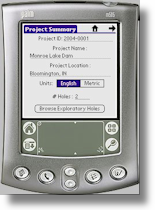 During the past decade, it has become commonplace for surveyors to utilize digital field data collection
technologies such as total stations and GPS units. Such a paradigm shift to digital field data collection
is yet to occur in mainstream geo-engineering applications.
PLog utilizes digital technology to the fullest
extent in order to provide an efficient, consistent and reliable field data collection system. During the past decade, it has become commonplace for surveyors to utilize digital field data collection
technologies such as total stations and GPS units. Such a paradigm shift to digital field data collection
is yet to occur in mainstream geo-engineering applications.
PLog utilizes digital technology to the fullest
extent in order to provide an efficient, consistent and reliable field data collection system.
- Relational database to maintain the links between the various hierarchical data entities typically recorded for a boring log
- Simplification of the field data collection process by providing a direct means for digital data entry
- Field data collected with other hardware devices such as GPS units and digital cameras can be integrated with the PLog system
- Capability to create a central database of subsurface information
- and
much more!
Get a quote
Back to top
TIPS
RockWorks14: Plotting curves on top of curves in 2D

When creating 2-Dimensional striplogs and
cross-sections in RockWorks, there is a trick to
overlay one column on top of another. In the Striplog
Layout Options window | under Curve Options | specify a negative value
for Left Margin.
More on RockWorks14
GWB 7 has Smart copy-and-paste!
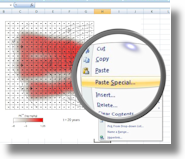
The ‘Smart copy-and-paste’ function in GWB 7
allows you to paste images from GWB into other applications
and automatically recognizes their format:
- Paste into Adobe Illustrator as a native AI drawing
- Paste into MicroSoft PowerPoint as .EMF graphic
- Using ‘Paste Special’ in MicroSoft Excel and Word to paste in as .EMF graphic, or..
- Using regular ‘Paste’ in MicroSoft Excel and Word (or any text editor) gives numerical values for lines in plot
More on GWB
Back to top
|

