(140) 05/07/2020/JPR - Bug Fix:
Clicking on a Load-Datasheet item within the Playlist will now show the Datasheet file name within the file open window. The same applies to the Save Datasheet command. Note: Selecting a new datasheet will change the item caption (as it should).
The previous version showed the item caption for Load Datasheet items while the Save Datasheet would save the datasheet using the item caption.
(139) 05/07/2020/JPR - New Feature:
An option titled "Export Summary Report" has been added to the Playlist / File menu. This option will create a RTF (Rich Text Format) file titled "Untitled.rtf" that simply lists the items within the Playlist. It then automatically loads the file into the default RTF editing program (e.g. Microsoft Word). If a previous version is already loaded into Word, an error message is displayed. The Export Summary Report option has no menu - it just creates and displays the file.
(138) 05/06/2020/JPR - New Version:
A new version of RockWorks2020 has been uploaded to the testing lab and RockWare webite:
https://www.rockware.com/downloads/software/rockworks/rockworks20_installation.exe
WARNING! If you have a Playlist file with a Load Datasheet command(s), edit it with a text editor as shown by the following example before you load it into the Playlist. Otherwise, the following item(s) within the playlist will be deleted.
Before:
DATASHEET: 0 Geochemistry_2016.RwDat
After:
DATASHEET: 0 Load 2016 Geochemical Data Into Datasheet
Geochemistry_2016.RwDat
END: LOADDATASHEET_CMD
(137) 05/06/2020/JPR - Bug Fix:
When specifying the title for a color legend, the carat symbol ("^") will position following text onto a new line.

(136) 05/06/2020/JPR - Bug Fix:
The Playlist / Add / Load Datasheet and Save Datasheet items can now be renamed.
(135) 05/06/2020/JPR - Bug Fix:
The Peripherals / Color Legend page now scrolls and the Label Decimation maximum value has been increased from 9 to 99.
(134) 05/06/2020/JPR - Bug Fix:
The Playlist / Add / Sound program now plays the proper selected sound.
(133) 05/05/2020/JPR - Improvements:
The following programs now include options for G-Value Filtering and Resampling within the track-selection page.
(132) 05/05/2020/JPR - Cosmetic:
The following changes have been made for the sake of consistency:
(131) 05/05/2020/JPR - Improvement:
If selected, the Setup / Reset / Reset Global Settings option will now restart the program upon completion. The confirmation dialog has been changed accordingly (see below).

(130) 05/05/2020/JPR - Bug Fix:
The Stratigraphy / Isopach 3D program now works correctly.

(129) 05/05/2020/JPR - Cosmetic:
Selected programs now display a secondary, blue percent-completed bar. While the status of the individual subroutines are displayed by the green progress bar (A), the secondary blue status bar (B) displays the progress of more time-consuming tasks which include many sub-routines. Although this secondary progress bar can be considered an "Overall Progress" bar, in some cases, the blue bar may reset when another lengthy task is started. The text to the left of the blue status bar will describe the operation associated with the progress bar. Think of the green bar as the second hand on a watch while the blue bar represents the minutes.

(128) 05/04/2020/JPR - Cosmetic:
The Default Layout will now dock the Project Manager along the left side of the main tab area and highlight the Borehole Manager page.

(127) 05/04/2020/JPR - Note:
The RockWorks2020 installation program has been renamed from "rockworks20_64_installation.exe" to "rockworks20_installation.exe". The 32-bit version has been discontinued.

(126) 05/04/2020/JPR - Bug Fix:
The 2D striplogs now use the correct column titles when plotting I-Data, P-Data, and T-Data with the Automatic option.

(125) 05/04/2020/JPR - Improvement:
The I-Data, P-Data and T-Data projected section programs (Model-Based and Hole-to-Hole) now prompt the user just once for the contour line and color-fill intervals, rather than for each panel.

(124) 05/04/2020/JPR - Bug Fix:
Gradient vectors no longer produce spurious lines when the slope equals zero or omit vectors when generating slices through solid models.

(123) 05/03/2020/JPR - Improvement:
The Peripherals / Title Block is now rescaled to the same relative dimensions and position when the Vertical Exaggeration of the initial diagram does not equal 1.0. The previous version would vertically stretch or compress the Title Block, including the Logo image.

(122) 05/03/2020/JPR - Improvement:
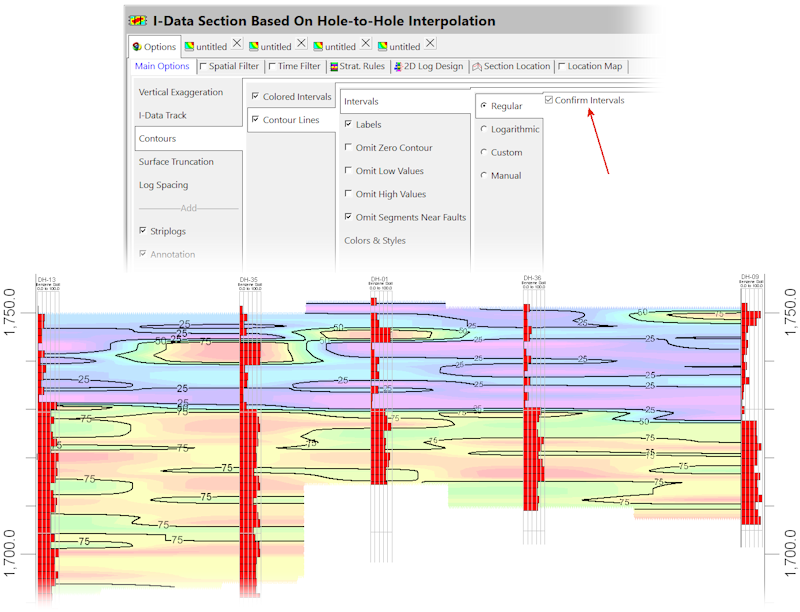
If solid-fill color contours are being plotted within I-Data, P-Data, or T-Data Hole-to-Hole sections at regularly-spaced intervals and the "Confirm Interval" option has been selected, the program will only ask once for the contour interval. This change works in conjunction with the Contour Lines option (lower example below).

(121) 05/03/2020/JPR - Improvement:
If contours are being plotted within I-Data, P-Data, or T-Data Hole-to-Hole sections at regularly-spaced intervals and the "Confirm Intervals" option has been selected, the program will only ask once for the contour and labeling intervals.
(120) 05/03/2020/JPR - Bug Fix:
The Grids -> 3D Stack program now works correctly.

(119) 05/03/2020/JPR - Data:
The coordinates within the Hydrochem_All.RwDat have been changed to be more evenly distributed within the project area.

(118) 05/03/2020/JPR - Cosmetic:
The Layout | Default option will position the Project Manager as the first tab.
(117) 05/02/2020/JPR - Improvement:
The aggressively red error message dialog is now dislayed in a less threatening gray. In addition, a Close button has been added to the dialog.

(116) 05/02/2020/JPR - Bug Fix:
If an application menu is being displayed on a monitor that is not the same as the main menu, the "Loading ..." message will now disappear as soon as the application menu has been rendered.
(115) 05/01/2020/JPR - Data:
Three new faults have been added to the Samples database. The purple faults represent a graben while the blue is intended as a reverse fault.

(114) 05/01/2020/jcj - Improvement:
PROJ Coordinate Transformation Library updated to Rel. 6.3.2, May 1st, 2020
(113) 05/01/2020/JPR - Bug Fix:
The I-Data / Statistics Map program now plots the data for the designated I-Data track.

(112) 04/30/2020/JPR - New Feature:
The Utilities | Maps| Point Symbols | Symbol Options | Symbols | Circles | Color sub-menu now includes an option for continuous color-coding based on automatic ranging between "cold" and "hot" colors.

(111) 04/30/2020/JPR - Bug Fix:
The Symbol Thickness option within the Borehole Map program now works correctly.

(110) 04/29/2020/JPR - Improvement:
Fault plotting and labeling within profiles have been re-designed as shown below. Note that labeling is not recommended for sections because the faults are projected into each panel (the region between each section vertex) resulting in redundant labeling. Despite this, fault labeling has not been disabled for sections for two reasons:

(109) 04/28/2020/JPR - Bug Fix:
The Lithology / Algorithm / Highest Probability / Filter settings now work correctly.

(108) 04/28/2020/JPR - Improvement:
The program no longer generates closed contours in which the area of the closed contour is less than the area of a grid cell.

(107) 04/28/2020/JPR - Improvement:
The program no longer generates spurious contour lines within flat areas (i.e. regions with no unique solution).

(106) 04/27/2020/JPR - Bug Fixes
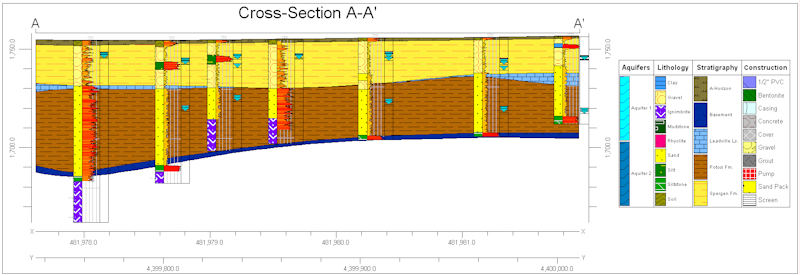
Faults are now plotted on all profiles, sections, and projected sections regardless of the Annotation checkbox setting.

(105) 04/27/2020/JPR - Bug Fixes:
Fault & Infrastructure plotting within Profiles, Sections, and Projected Sections are no longer dependent upon the Annotation or Index Map settings.

(104) 04/26/2020/JPR - Improvement:
The Solid -> Plan Map menu now includes options for either interactively selecting (during execution) or pre-selecting the the slice elevation.

(103) 04/26/2020/JPR - Improvement:
The Multiple 3D Striplogs / Output menu now includes a Group Name setting which will be used as parent group for the Logs within RockPlot3D.

(102) 04/26/2020/JPR - Improvement:
The individual pattern legends are now draggable as separate entities. Right-clicking on a legend will display a menu of legend properties that may be changed.
(101) 04/25/2020/JPR - Improvements:
All sub-menus of the 2D and 3D log designers have been adjusted such that any dimensions or offsets have two decimal places.
(100) 04/25/2020/JPR - Improvements:
The Peripherals Title Block has been modified as follows:

(099) 04/25/2020/JPR - Bug Fix:
The 2D log column titles for 2D Idata, Pdata, and Tdata may now be either Automatically determined (based on the Track title) or Manually specified (based on whatever is entered in the menu below).

(098) 04/25/2020/MMM - Bug Fix:
Images have been added to the Abstract descriptions for the following programs.

(097) 04/24/2020/MMM - Cosmetic:
Images have been added to the Abstract descriptions for the following programs as well as those listed in the 04/21/20 update.

(096) 04/24/2020/MIW - Improvement:
Added Pattern Scaling options to the All Logs to PDF program (shared with RockPlot2D).

(095) 04/23/2020/JPR - Data:
The Samples Project Dimensions are now identical to the RockWorks17 dimensions.
(094) 04/22/2020/JPR - Bug Fix:
Well construction within 2D striplogs now plots correctly both with and without text.

(093) 04/22/2020/JPR - Bug Fix:
The 2D striplog Fractures and Vectors now include radio buttons that determine if the tadpole colors are defined by the associated colors within the database versus fixed colors.

(092) 04/22/2020/JPR - Improvement:
The behavior of the aquifer annotation has been changed as follows:

(091) 04/22/2020/JPR - Data:
Seven faults have been added to the Samples database. Six of these faults are complex while one is a simple sub-vertical plane.

(090) 04/21/2020/JPR - Bug Fix:
The Borehole Operations | Striplogs | 2D Projected Log Section program now works correctly. The previous version would not plot anything.

(089) 04/21/2020/MMM - Cosmetic:
Images have been added to the program abstracts for the 10 applications shown below.
(088) 04/21/2020/jcj - Improvement:
Before restoring a backup there is a dialog to check if the user wants to make a backup first. The dialog was a bit confusing and annoying. I re did it in the task style.

(087) 04/??/2020/MIW - New Feature:
A new "All Logs to PDF" program has been added. The example below shows the output loaded into Microsoft Word.

(050) 04/21/2020/JPR - New Feature:
In addition to showing error messages as red text within the Execution History, the errors are now displayed, by default, within a very noticable dialog box that provides the user with two options: (1) Continue Processing, and (2) Restart RockWorks.
The new error dialog also provides an opportunity for the user to prevent future error interruptions and always continue processing. If disabled, the error dialog may be re-activated by changing the Setup | Preferences | User Interface | Display Error Message Dialog setting. Turning off the error message dialog may be desired when processing Playlist scripts where the user just wants to "plow" through the data and review any error afterwards within the Execution History tab.
The Restart option is included for those instances in which proceeding with a Playlist script would be meaningless and/or overly time consuming.

(086) 04/20/2020/JPR - Bug Fix:
The Borehole Manager/ View button now longer stays highlighted if the cursor passes over it. The Datasheet buttons (File, Edit, Search, etc.) now highlight to blue rather than white on light gray (virtually invisible).

(085) 04/20/2020/jcj - Improvement:
The SQL Statement Command for the Playlist and Command Scripts can now handle multiple statements separated by semi-colons, so if you need to do say 2 updates in a row, you can use one SQLStatement_cmd instead of 2.
(084) 04/20/2020/JPR - Bug Fix:
The Solid Morphing program now correctly uses the Direction, Inclination, and Zoom settings.
(083) 04/20/2020/JPR - Bug Fix:
The new Filters options within the 3D Diagram Type page (the page where the user selects between Isosurface and Voxel diagram for all solid diagrams) now works correctly. This new capability is used to create an initial display in RockPlot3D that eliminates the need to manually change the attributes within RockPlot3D. More importantly, this capability if essential for initially displaying the solid in a pre-filtered state when creating animations and Playlist scripts that generating PNGs.

(082) 04/19/2020/JPR - Bug Fix:
The XYZ -> 3D Surface Animation program menu now includes the Direction/Inclination/Zoom options and the animations work correctly.
(081) 04/19/2020/JPR - Bug Fix:
The Direction/Inclination/Zoom options now work correctly within the Grids -> 3D Surface Animation program
(080) 04/19/2020/JPR - Bug Fix:
The RockPlot3D File -> Animation program no longer displays a Label Frames option within the Output page.
(079) 04/19/2020/JPR - Bug Fix:
The RockPlot3D File -> Animation program now (1) correctly uses the Direction, Inclination, & Zoom settings, and (2) these settings are no longer changed the next time the menu is loaded.
(078) 04/19/2020/JPR - Bug Fix:
The Polygons-per-Page setting within the Stiff Diagram program now plots the correct, specified number of polygons within each page.

(077) 04/19/2020/JPR - Bug Fix:
Text within the following 2D striplog columns is no longer unpredictably plotted upside-down and to the left of where it should be:
Fracture Text
Pattern Text
Symbol Text
Vector Text
Note: This bug fix may address currently unidentified bugs within other programs that create two-dimensional diagrams with text that is "hardwired" to be horizontal.

(076) 04/19/2020/JPR - Bug Fix:
The "Omit Columns With No Data" option within the 2D Log Designer / Miscellaneous menu now properly omits the following data columns when there is no associated data for that particular data column:
Aquifer Text
Fracture Text
I-Data Text
Lithology Text
Pattern Text
Stratigraphy Text
Symbols Text
T-Data Text
Vector Text

(075) 04/19/2020/JPR - Bug Fix:
The title bar within the Select Project Image menu has been fixed.

(074) 04/19/2020/JPR - Cosmetic:
The Production Graph, Production Graph Map, and Google Earth Production Billboard menus have been re-designed.

(073) 04/17/2020/JPR - Improvement:
The Time Filter tab is now used by all of the Borehole Operations | Production programs. Given that the Exact option makes no sense, the Exact Date and Range button are not visible when used by the Time Filter.

(072) 04/18/2020/JPR - Bug Fix:
The "Include Time Within Date Fields" checkbox now works correctly.

(071) 04/17/2020/JPR - Bug Fix:
The Location Map | Output page for the following programs now include options to either append the location map to the section or create a separate diagram.
Aquifers / Projected Section
Colors / Projected Section
Fractures / Projected Section / Model Based
Idata / Projected Section / Model Based
Idata / Projected Section / Hole-to-Hole
Pdata / Projected Section / Model Based
Pdata / Projected Section / Hole-to-Hole
Solid / Projected Section
Stratigraphy / Model-Based
Stratigraphy / Linear Correlations
Striplogs
Tdata / Projected Section / Model Based
Tdata / Projected Section / Hole-to-Hole

(070) 04/17/2020/JPR - Cosmetic:
Text within Output Options | Display page now auto-wraps.

(069) 04/16/2020/JPR - Bug Fix:
The 3D Striplog Aquifers | Single option now works correctly.

(068) 04/16/2020/JPR - Cosmetic:
The Vectors|Appearance page within the 3D Striplog Designer has been redesigned to occupy less vertical space and will now scroll if the menu dialog is condensed.

(067) 04/16/2020/JPR - Bug Fix:
Pattern captions within 3D striplogs now plot in the center of the interval.

(066) 04/16/2020/JPR - Bug Fix:
The Borehole Operations | Fractures | Stereonet Map program now works correctly.

(065) 04/15/2020/JPR - Bug Fix:
The Miscellaneous Options button within the 2D striplog designer now works correctly.
(064) 04/15/2020/JPR - Cosmetic:
The Animate|XYZ -> 3D Surface Animation program no longer duplicates the 3D options (Striplogs, Draped Image ... Output Options) within the Grid Display page.
(063) 04/15/2020/JPR - Bug Fix:
The Faults | Import | Dips -> Fault import program now reads the upslope distance correctly, and yes, this is art.

(062) 04/15/2020/JPR - Cosmetic:
The Faults | Import | Dips -> Fault import program now has an icon and the title is no longer bolloxed up.

(061) 04/15/2020/JPR - Bug Fix:
The Animate|XYZ -> Contour Map Animation|Output and Grid -> Contour Map Animation Options pages no longer lists the Width and Margin. Instead, all output, except for GIF, is hardwired to 1920 pixels. Margins can be added via the Border settings. Below are two examples of animated GIFs.


The sample file for the Animate | XYZ -> Contour Map Animation has been changed to Hydrochem_All.RwDat.
(060) 04/15/2020/JPR - Cosmetic:
The Animate|XYZ -> Contour Map Animation program no longer duplicates the map options (Background Image, Labeled Axes ... Output Options) within the Grid Display page.
(059) 04/15/2020/JPR - Comment:
The time-based programs generate an error message ("Invalid date ...") when reading a date from Hydrochem_All.rwdat. It turns out that the offending date (2/29/94) is, in fact, incorrect because 1994 was not a leap year. The date has been changed to 2/28/94. Proof that RockWorks uses advanced neural-net AI.
(058) 04/15/2020/JPR - New Feature:
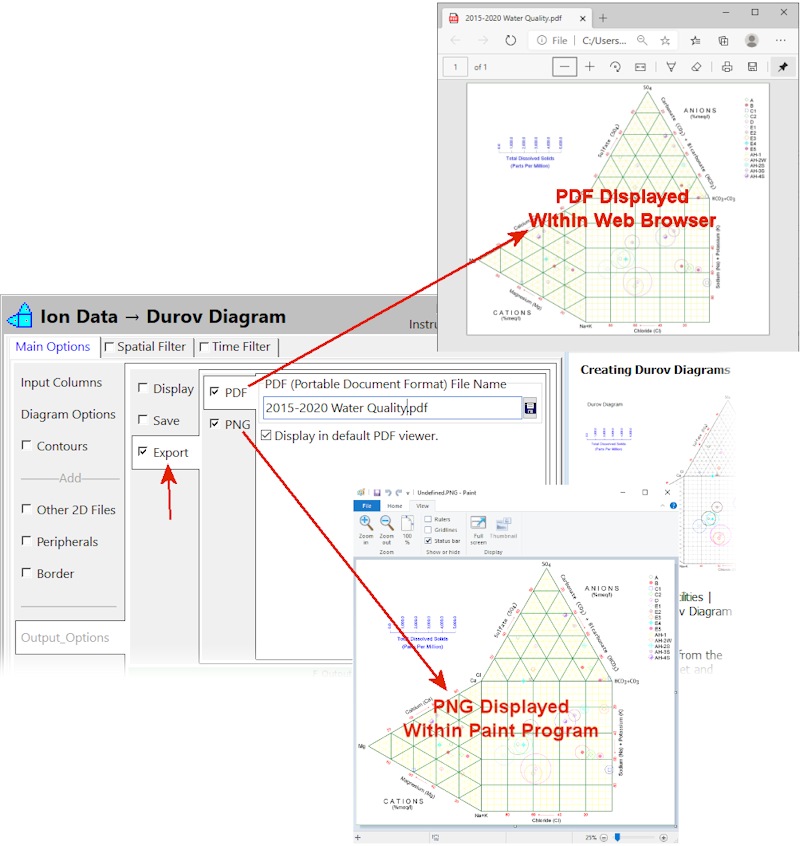
All programs that generate 2D diagrams now include options for simultaneously exporting the output to PDF and/or PNG. This eliminates the extra steps of manually exporting the diagrams within RockPlot2D. In an effort to simplify these exports, the output resolution is configured to create bitmaps in which the horizontal dimension is at least 2,400 pixels. This new capability is especially useful when automating workflows via Playlist scripting.
(057) 04/14/2020/jcj - New Feature:
From the Playlist Menu you can add a command to Backup the database (also works from a command script)
(056) 04/14/2020/jcj - New Feature:
Option to bring in existing Playlists, RwMenu and Command scripts when creating a new project was added.
(055) 04/14/2020/MIW - Bug Fix:
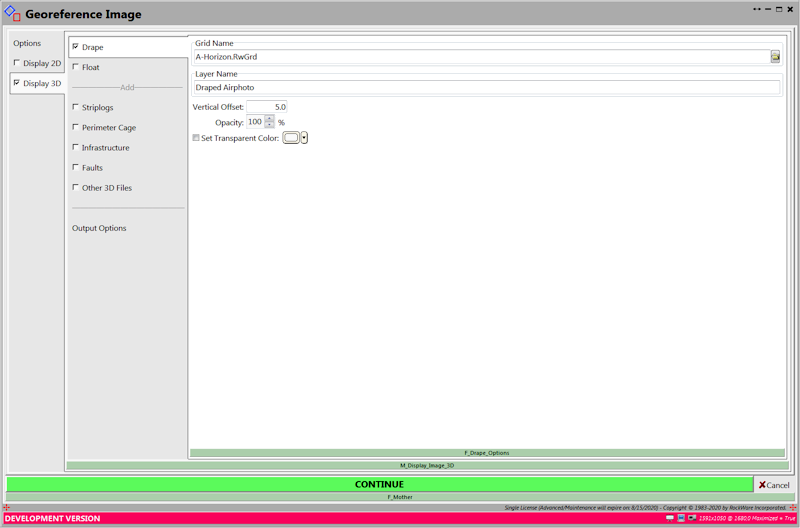
Added 2D and 3D output to the GeoReference program.
(054) 04/14/2020/JPR - Bug Fix:
The following programs now generate models if the "3D Solid Diagram" tab is unchecked.
Vectors | Solid Model (CaveSolid)
Colors | Solid (ColorSolid)
Solid | Create | Fractures -> Solid (Discs2Solid)
Fractures | Solid Model (FracSolid)
I-Data | Solid (IdataSolid)
Lithology | Solid (LithSolid)
P-Data | Solid (PdataSolid)
T-Data | Solid (TdataSolid)
Solid | Create | ASCII XYZG -> Solid (Txt2Solid)
Solid | Create | Images -> Solid (Vpanels2Solid)
Solid | Create | XYZG -> Solid (Xyzg2Solid)
(053) 04/14/2020/JPR - Cosmetic:
The ModOps|Solid|Display program no longer has a checkbox within the 3D Solid Diagram tab.
(052) 04/14/2020/JPR - Bug Fix:
Pdata within 2D striplogs now plot correctly when the scaling is set to manual. Note: When plotted logarithmically, gradational color-fills take a significantly longer amount of time to render.

(051) 04/13/2020/JPR - Bug Fix:
A very rarely-encountered bug (first time in many years) within the solid model polygon clipping has been fixed.

(050) 04/13/2020/JPR - Bug Fix:
Temporarily docking the Execution History to the base of the LaunchForm during program execution and hiding the Continue button has been reinstated.

(049) 04/12/2020/JPR - Cosmetic:
The formatting/positioning within the Longitude/Latitude sub-dialog within the Google Earth Output Options menu has been fixed and the unlabeled button now has a "Format" caption. Note: This same sub-dialog is used in dozens of other programs which should benefit as well from the new formatting.

(048) 04/12/2020/JPR - Cosmetic:
The Automatic explanation within the 2D output dialog has been moved to the base of the dialog so that it no longer overplots the other options is the screen width is reduced too much. Also, "a application" was changed to "an application".

(047) 04/12/2020/JPR - Cosmetic:
If the Setup|Preferences|System|User Interface|Display Helpful Information option is disabled, help information will no longer appear within the following options that are displayed across the top of the LaunchForm:
FENCE_LOCATION
PROFILE_LOCATION
PROSECT_LOCATION
SECTION_LOCATION
SPATIAL_FILTER
TIME_FILTERING
STRAT_RULES
2D_LOG_DESIGNER
3D_LOG_DESIGNER
LOCMAP_OPTIONS
(046) 04/12/2020/JPR - Bug Fix:
The 3D log axis tube radius style and color settings now work correctly.

(046) 04/12/2020/JPR - Bug Fix:
Lithology labels within 3D logs are now plotted at the interval midpoints.

(045) 04/12/2020/JPR - Bug Fix:
Stratigraphy labels within 3D logs are now plotted at the interval midpoints.

(044) 04/12/2020/JPR - Cosmetic:
The Playlist File/Import command has been renamed to "Import RwMnu File" and a Replace/Append/Cancel dialog appears after the file has been selected.

(043) 04/12/2020/JPR - Cosmetic:
The following changes have been made to the list of Applications within the main menu:
1. A +/- button has been added to the upper/left corner of the Application area within the main menu that is used to show/hide the Applications. This provides more space for working with the Playlist items (see upper example below).
2. If the width of the dialog box will not accomodate all of the options, a horizontal scrollbar will automatically appear providing access to the items outside the dialog and the height of the Application area will be adjusted accordingly.
3. If the speedbar is hidden, an empty horizontal strip, 13-pixels high will remain to accommodate the +/- button (see lower example below). Because of this new feature, the minimum adustable width for the main form have been reduced from 1189 to 889 pixels.

(042) 04/12/2020/JPR - Cosmetic:
The following changes have been made to the speedbars (buttons vertically aligned along the left side of the menu) within the Borehole Manager, DataSheet, PlayList, and Fault Manager:
1. The +/- button that is used to show/hide the speedbar has been relocated into the upper-left corner of the speedbar.
2. If the height of the speedbar will not accomodate all of the options, a vertical scrollbar will automatically appear providing access to the items below the dialog.
3. If the vertical scrollbar is visible, the speedbar width will be automatically increased to accommodate the width of the scrollbar. Conversely, if the scrollbar is not visible, the speedbar width will be decreased accordingly.
4. If the speedbar is hidden, an 11-pixel wide column will remain to accommodate the +/- button.

(041) 04/12/2020/JPR - Bug Fix:
The Select Project Image icon and overlapping title has been fixed.

(040) 04/12/2020/JPR - Bug Fix:
3D Well Construction labels are now visible. 3D Well Construction lables are now positioned at the center of the interval.

(039) 04/12/2020/JPR - Bug Fix:
New version uploaded to testing lab and web site: https://www.rockware.com/downloads/software/rockworks/rockworks20_64_installation.exe
Fence diagram index maps now plot consistently. The previous version would not plot the index map if the Append setting was enabled the last time an index map was plotted in conjunction with a section, profile, or projected profile. Also, the index map output options now work correctly. The output file name and other options are now recognized correctly.

(038) 04/10/2020/JPR - Bug Fix
Index maps that are appended to sections, profiles, and projected sections now "respect" the specified vertical exaggeration factor.

(037) 04/10/2020/JPR - Bug Fix
The Annotation checkbox within the Section, Profile, and Projected Section menus now works correctly (i.e. turns off ALL options shown within the Annotation page including the horizontal lines plotted in the background).

(036) 04/10/2020/JPR - Cosmetic
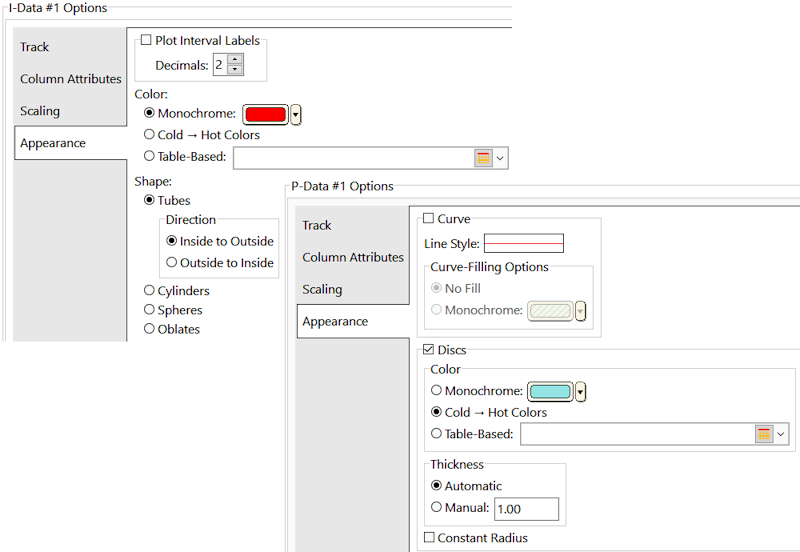
3D I-Data, T-Data, & P-Data striplog Appearance menu tweaked so that there's more space allocated for table names.
(035) 04/10/2020/JPR -
Just in case (spelled "Hoarding Disorder")... the Menu Tree (aka MenuMap) that was removed from the Search menu lives on within the DevStuff menu (i.e. the menu that's only visible in Geek Mode). My thinking is that someday, it might be a nice tool for adding stuff to the Playlist.

(034) 04/10/2020/JPR - Improvement
Right-clicking on an item within the Search list now shows the name of the program at the base of the popup.

(033) 04/10/2020/JPR - Improvement
The crud has been removed from the Search menu and it's now much cleaner. Rationale:


(032) 04/07/2020/JPR - Improvements and Bug Fixes
The following changes have been made to Surface Map programs.
These have been applied to the following programs:

(031) 04/07/2020/JPR - Bug Fix
Weirdness in LaunchForm fixed whereby after processing some data, the Spatial Filters options are displayed in the Main Options page.
(030) 04/06/2020/JPR
Remaining TCE Case Study Tasks:

(029) 04/06/2020/JPR - Improvement:
If the user manually types in a name for an output file and omits the extension, it will be automatically added when the file name is being saved. When the menu is re-loaded, the new file name, with the extension, will be displayed. Many programs don't care if there's no extension, but the FFMPEG program bombs.

(028) 04/05/2020/JPR - New Feature
About the TCE Site dataset .... it's a dinky, 1.9mb folder that contains an airphoto, a playlist, and a borehole database that is the centerpiece for a step-by-step, pseudo-case-study exercise titled "Automating Time-Based Modeling, Analysis & Visualization of Groundwater Contaminant Migration Using RockWorks2020".

(027) 04/05/2020/JPR - Improvement
The green button caption that appears at the top of a Playlist item that is being edited/examined has been changed from "Save menu settings & return to previous menu." to "Save menu settings & return to Playlist."

(026) 04/04/2020/JPR - Improvement
The Google Earth Terrain notice has been added to the following programs and the wording has been changed from "to work properly" to "to work optimally":
(025) 04/04/2020/JPR - Improvement
Katy added a Mantis item about the Google Earth Golf Ball Simulation not working. Sure enough, it didn't work for me either until I finally noticed that the Terrain option within Google Earth wasn't enabled. Not a bug on our part, but it served as the impetus for an idea to add a special, vertical YOU-BETTER-READ-THIS strip to the left side of the Launcher to addresses common, show-stopping mistakes. This special panel reads the content from a resource file. It includes a slider bar and won't be disabled if the user turns off the help messages. It's very easy to enable and add content, so if anybody notices other instances where it might be appropriate, please let me know. In the meantime, I'll try to implement the Terrain notification for other programs where it could be a problem

(024) 04/02/2020/JPR - New Feature
A new option titled "Display helpful information." has been added to the Preferences | User Interface page. By default, this option is checked. If unchecked, menus will load very quickly.


(023) 04/02/2020/JPR
Mitch & JimJ: I made a bunch of major changes to the LoadResource.pas file that rendered it unusable with LogPlot and RockWorks17, so I moved it to the RockWorks2020/Source folder and reverted the version in RwLib32U.
(022) 04/01/2020/JPR - Improvement
The Preferences|User Interface|Save menu settings ... option has been removed.

(021) 04/01/2020/JPR - Improvement
The Cancel button will now present the user with a "Discard menu changes?" option.

(020) 03/28/2020/JPR - Bug Fix
The Idata, Pdata, Tdata, and Fracture fence diagrams now use the correct color settings. Also several of the 3D programs (can't remember which ones) no longer plot the same legends twice.
(019) 03/28/2020/JPR - Improvement
The 3D Legends menu now includes an option (enabled by default) for automatically offsetting multiple legends. If unchecked, it will be up to the user to manually specify the legend positions.

Note how the Y position is also variable within the Automatic Spacing menu.

Please note that the Colors legend menu does not have a Title option, unlike all of the other legends. That's because the title is assigned at runtime when the title is automatically assigned based on what the user is modeling.

(018) 03/28/2020/JPR - Improvement
Aquifer, Lithology, Stratigraphy, and Well Construction 3D legend titles can now be changed within the Legend(s) page.

(017) 03/27/2020/JPR - Cosmetic
Cage program moved to 3D Tools pulldown.

(016) 03/27/2020/JPR - Improvement
All of the HydroChem programs now use the Spatial Filter and Time Filter options. In addition, the Input Columns tab page now has checkboxes that determine if the program will attempt to read the associated data from the datasheet. This allows a way for the user who may not have Sample ID, Symbol, Date, or Coordinate data to still use the programs. If, however they wish to perform any Spatial or Date filtering, they'll need to add the associated data to the datasheet and set the column information within this menu. The program will list warnings in the Execution History list if something doesn't make sense (e.g. Time Filter activated by Date Column deactivated). The programs have been modified to run, regardless of the column settings. For example, if the Symbol Column is disabled, the Stiff polygons will be black. The checkbox for the Location will not be shown for the Stiff Map program (XY are required). The various options are shown in the table shown below


(015) 03/27/2020/JPR - Improvement
A new version of the "Hydrochemistry_All.rwdat" file has been copied to the RockWorks20 Tutorial Data folder. This file contains additional columns (i.e. Date and Elevation). The default data columns have been changed accordingly for all seven of the HydroChem programs

(014) 03/26/2020/JPR - Bug Fix
Primary and secondary titles no longer swapped if title box height is small.

(013) 03/24/2020/JPR - Cosmetic
The Spatial Filter cartoon has been moved to the bottom of the dialog based on the idea that if something is going to be obscured, the cartoon should be the first to go.

(012) 03/24/2020/JPR - New Feature
A new program titled "Ion Report" has been added to the Hydrochem menu. The menu is pretty much identical to the other Hydrochem programs. This program was actually developed to test a new subroutine that builds a data structure to be shared with the the other Hydrochem programs. The basic idea is to apply the time and spatial filtering as the data is being loaded. I've still got a lot of work left in making the date and XY (Z?) columns optional and modifying the other Hydrochem programs use the new data structure. Someday (RockWorks 2021), this data structure could be used for creating Hydrochem diagrams for T-Data.

(011) 03/22/2020/JPR - Improvement
A video button explaining the Project Folder (ala' RW17) has been added to the right of the Project Folder input box.

(010) 03/22/2020/JPR - Improvement
The following changes have been made to the Videos tab:
Admittedly, this adds an extra mouse click, but that was the main impetus for making these changes in the first place. On multiple occasions I have inadvertently launched videos.

(009) 03/22/2020/JPR - Cosmetic
A vertical scroll bar will now appear within the Playlist speedbar if it extends below the base of the dialog.

(008) 03/22/2020/JPR - Cosmetic
The Project Summary tab will now automatically display a horizontal scrollbar if there isn’t enough space to show all of the settings and the height of the page will be increased accordingly. The downside is that this uses more vertical space, but … c’est la vie.

(007) 03/22/2020/JPR - Cosmetic
The following sub-pages now have automatically appearing scrollbars:

(006) 03/21/2020/JPR - New Feature
A new application titled “Merge 2 Files” has been added to the Graphics / 3D Tools pulldown menu (Mantis Item #8401). To minimize confusion, the Combine application within this menu has been renamed to “Merge 2+ Files”.

(005) 03/21/2020/JPR - Bug Fix
The Stiff program now saves the output for single or multiple diagrams with tabs within the LaunchForm. Also, the program now plots the Peripherals and Border.


(004) 03/21/2020/JPR - Bug Fix
The “Other 2D Files” option has been removed from the Stiff program menu because it will never be used and it will never work properly due to the unpredictable dimension of the Stiff diagrams.

(003) 03/21/2020/JPR - Cosmetic
Multiple instances of the LaunchForm now display the uppermost buttons (e.g. Settings, Example, etc.).

(002) 03/20/2020/JPR - Bug Fix
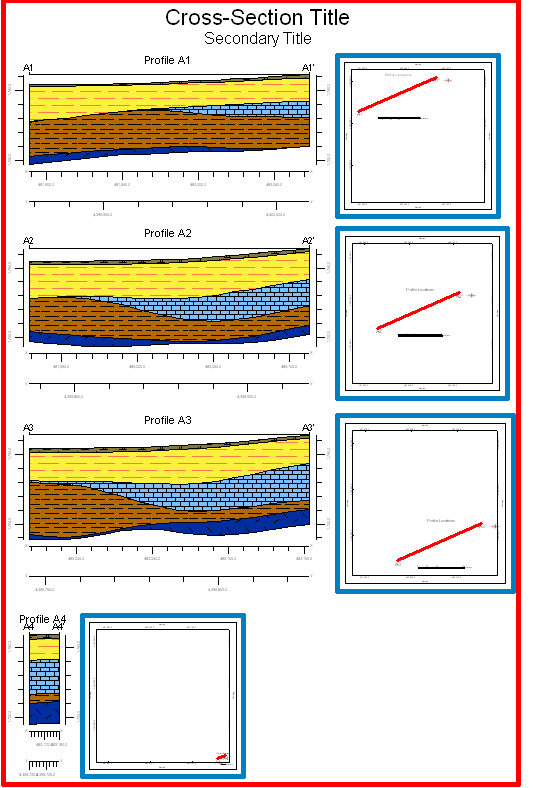
Index maps now correctly plotted within multi-profile diagram.

(001) 03/20/2020/JPR - Bug Fix
The Location Maps that are plotted in conjunction with slices (profiles, sections, and projected sections) now share the same code when embedding the index maps as well as creating separate diagrams (non-embedded index maps). This means that they are consistent. Previously, the embedded index maps plotted the peripherals before the border annotation resulting in a bad map (note bad maps within previous posting) while the separate diagram maps were OK.
03/20/2020/JPR - Bug Fix
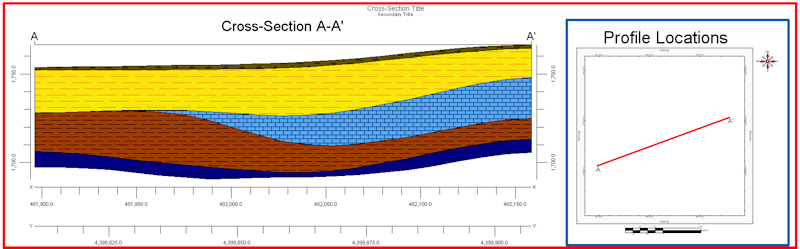
Parallel profiles are now properly spaced when grouped into a single diagram. Index maps too.