New Versions
New RockWare Customer Portal
Check out our newest website addition - the RockWare Customer Portal. It's designed for registered users of RockWorks, LogPlot, RockWare GIS Link, and AqQA software licenses, where you can:
> view
all of the licenses in your organization
> see
upgrade options
> purchase upgrades
> view maintenance status
> renew maintenance
> access software download links
> and more to come!
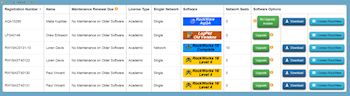
If you have not yet signed up through the Portal, click Register New Account using your license number and registered email address. Or, click Log In if you have already registered.
In the Portal you'll see all of your licenses, sortable by user name, license number, software title. Click the Maintenance button to view renewal pricing with an option to purchase. Click the Upgrade button to see upgrade pricing with an option to purchase. Click the Download button to download the most recent version.
Visit the Portal
MapInfo Pro v16
New version of this popular desktop GIS
MapInfo Professional helps business analysts, planners, GIS professionals - even non-GIS users - gain new insights into their markets, share information-rich maps and graphs and improve strategic decision-making.
The latest release of MapInfo Pro is simpler, faster and smarter: visualize data your way, right away.

What's new in MapInfo Pro v16:
+ Change thematic map settings easily and interactively.
+ Interactive ranges now appear in the layers list.
+ New Theme ribbon tab enables easy visualization and data analysis.
+ New color palettes
+ Improved labelling options: tools, placement, formats
+ Much more
Read more
Download demo
Get a quote
MapInfo Discover 2016 and MapInfo Discover 3D 2016
New versions
Built on MapInfo Pro, MapInfo Discover is a comprehensive package for the compilation, mapping and analysis of spatial geosciences data, whether you are conducting mineral exploration, hydrological analysis or environmental assessments.
The latest version of MapInfo Discover 64-bit packs a punch, incorporating the GIS industry’s most advanced raster grid analysis solution, MapInfo Pro Advanced. Now you can analyse and manipulate high-resolution imagery and grids with ease.

What's new in MapInfo Discover 2016:
+ GPS Connectivity for accurate and real-time field data capture
+ Comprehensive support for the Multi-Resolution Raster (.MRR) format within most MapInfo Discover tools, including multi-banded rasters
+ New Raster group on the ANALYSIS tab incorporates Geophysical (FFT) filters, Contour Labelling and the Contour Label Positioner
+ The drillhole module now implements MapInfo Pro 16.0’s new Geopackage as the core database, natively storing your drillhole data as a complete 3D geometry dataset
+ Much more
Read more
Download demo
Get a quote
RockWorks 17
New update of our premier geologic modeling software
Latest improvements to RockWorks 17:
+ Video help buttons have been added to many menus (2D maps, datasheets, exports, , log sections, scalebars, peripheral images, more).
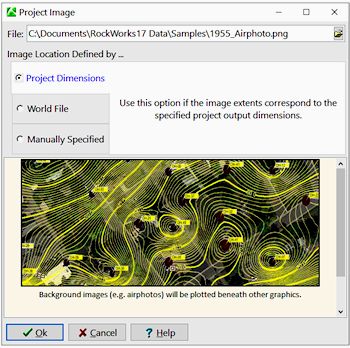
+ A Project Image tab has been added to the project group of tabs at the top of the program window. This can be a satellite image, airphoto, scanned map, or any other type of raster image that can be used as a map background image for profile stripmaps and future applications
+ Include Project Images in profile stripmaps
+ New RCL command (NEWPROJECT:) which brings up the "Create New Project Wizard" and populates the "New Project Folder" field with data from the RCL script.
+ Add peripheral images, such as logos or north arrows, to your map borders. Some example images are now installed with the program.
+ Add a scalebar to your map borders
+ A Coordinate System Summary is now displayed in a green box to the right of the Datasheet menu bar. If there is a mis-match between the coordinates defined for the datasheet columns and the project, the box will turn red.
+ New "smarts" have been added to the Utilities EZ Mapper and Grid-Based Mapper so that spatial data columns with undefined coordinates and units can be assumed to comply with the project coordinates and automatically updated as such
+ Program can warn user if section endpoints are outside the defined project area.
+ Much more.
Read more
Download demo
RockWorks pricing
LogPlot 8
New update of our popular log plotting software
Latest updates in LogPlot 8:
+ Improved batch editor and PDF output
+ Improvements to the LogViewer's scrolling display
+ Improvements to PDF, PNG, JPG exports

Read more
Download demo
LogPlot pricing
Web Resources
RockWare Videos
Overwhelmed by all of the new RockWare Videos (dozens in the last 2 months)? Check out the Updated Video Index.
Here are our latest additions:
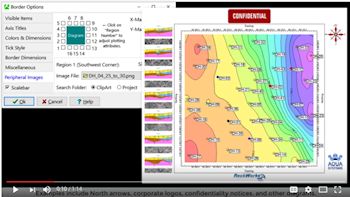
Adding Peripheral Images to Maps in RockWorks
(RockWare)
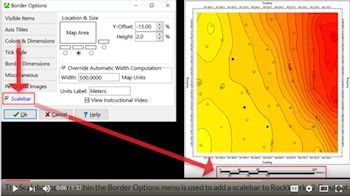
Adding Scalebars to Maps in RockWorks
(RockWare)
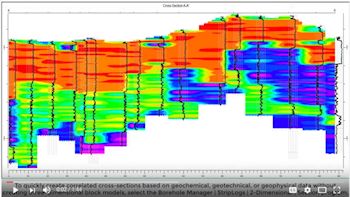
Geophysical Sections in RockWorks without Block Modeling
(RockWare)
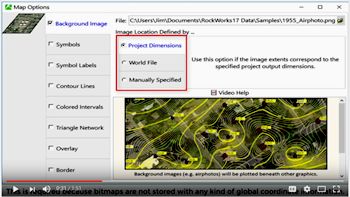
Adding a Background Image in RockWorks
(RockWare)
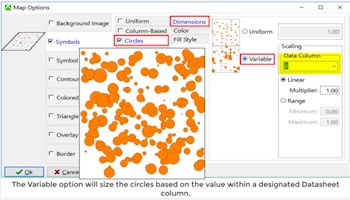
Symbol Map Options in RockWorks (aka Perhaps the most boring video yet produced)
(RockWare)
TRAINING
FREE RockWorks Workshop
Free 2-day class for RockWorks 17!
When: February 1-2, 2017
Where: Golden, Colorado
Cost: FREE
This class is designed for beginning, intermediate, and advanced users of RockWorks. All industries are welcome - we will discuss RockWare's use in civil engineering, environmental, mining and petroleum applications. Learn about surface models, solid models, logs, cross-sections, fence diagrams, mapping tools, animations, and much more.
Read more
Download demo
Register now!
|